H.264 is one of the most widely used video codecs. It has a strong presence in optical disc, broadcast, and streaming video markets. However, some H.264 uses require royalty payments. Therefore, review the licensing terms before you adopt the codec.
You should also compare H.264 with other available technologies, such as Google’s WebM. For example, consider image quality, bitrate, and decoder availability on target platforms and devices. The H.264/AVC project aimed to provide good video quality at much lower bit rates than earlier standards. In many cases, H.264 can use half the bit rate, or less, of MPEG-2, H.263, or MPEG-4 Part 2.
At the same time, the standard avoids excessive implementation complexity. It achieves this balance through several features. These include a reduced-complexity integer discrete cosine transform (integer DCT), variable block-size segmentation, and multi-picture inter-picture prediction. Moreover, H.264 supports many types of applications and networks. Developers can use it for low- and high-bitrate video, low- and high-resolution content, broadcast systems, DVD storage, RTP/IP packet networks, and ITU-T multimedia telephony systems.
H.264 standard
The H.264 standard includes several profiles. However, the High Profile remains the most commonly used format. A decoder supports at least one profile, but it may not support every profile.
The standard defines the encoded data format and the decoding process. However, it does not require a specific video encoding algorithm. Instead, encoder designers can select their own methods. As a result, developers have created many encoding schemes with different speed, quality, and hardware requirements.
Codec
This H264 codec uses Intel Media SDK. The filter uses hardware-accelerated video encoding technology available in some Intel processors. Intel introduced Quick Sync technology with the Sandy Bridge architecture on January 9, 2011.
Quick Sync, like other hardware video encoding technologies, may produce lower quality than CPU-only encoding. However, it can significantly reduce CPU load during video encoding. Therefore, it can be useful when encoding speed and processor usage matter more than maximum image quality.
Requirements
Intel Quick Sync Video accelerates video transcoding from Blu-Ray format to lower-bitrate formats for mobile devices. Intel Core i3, Core i5, and Core i7 processors based on the Sandy Bridge core support this technology. In addition, later processor generations also support Quick Sync.
If the computer does not support Intel Quick Sync, the codec works in compatibility mode instead.
Input format
The H264 codec accepts several common input formats. These formats include RGB32, ARGB32, NV12, YV12, UYVY, YUY2, and YUYV.
| majortype | MEDIATYPE_Video |
| subtype | MEDIASUBTYPE_ARGB32, MEDIASUBTYPE_NV12, MEDIASUBTYPE_RGB32, MEDIASUBTYPE_UYVY, MEDIASUBTYPE_YUY2, MEDIASUBTYPE_YUYV, MEDIASUBTYPE_YV12 |
| formattype | FORMAT_VideoInfo, FORMAT_VideoInfo2 or FORMAT_MPEG2_VIDEO |
Output format
The H264 codec outputs a compressed H.264 video stream.
| majortype | MEDIATYPE_Video |
| subtype | MEDIASUBTYPE_H264 |
| formattype | FORMAT_VIDEOINFO2 |
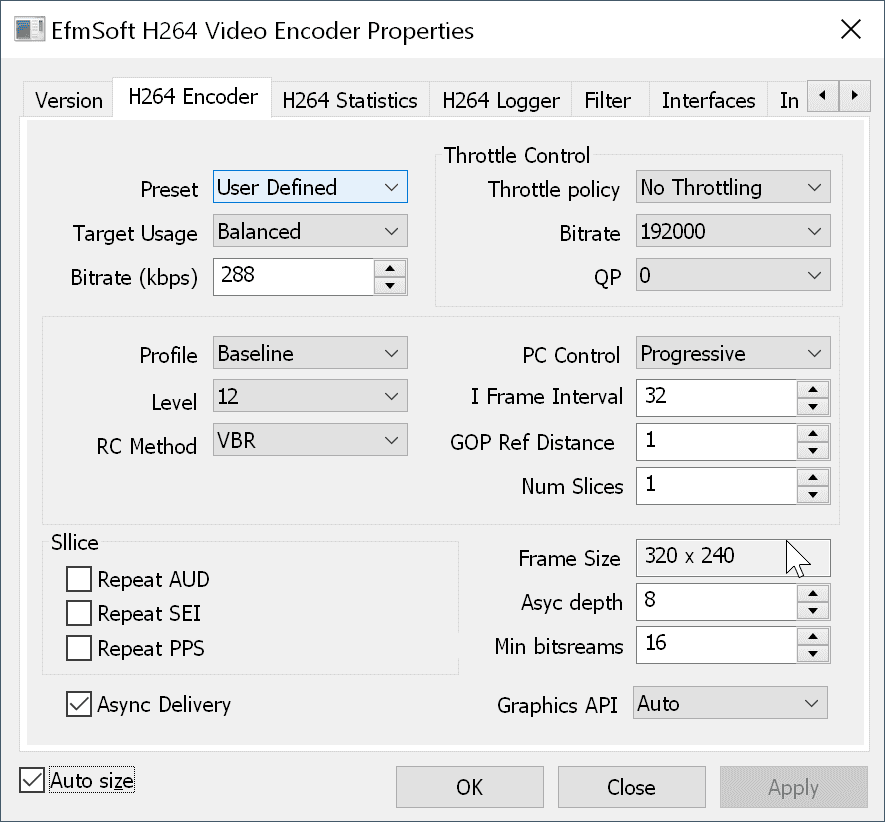
Property page
Use the property page to configure codec settings and control the encoding process.
Limitations of the free version of the filter
The free version allows each process to create only one H264 codec instance. This limitation matches the rules for other DirectShow filters. However, many applications need only one codec instance. Therefore, the free version may be sufficient for such projects.
Download
| free x86 version | |
| free x64 version |